
Reducing cloud costs for a legacy platform running on AWS
Lowering the cost of running in the cloud usually comes from using the right cloud services, at the right time. In this blog, we cover how we reduced a client’s AWS bill by $10,000+/month.
 Victor RodriguezJuly 23, 202618 min. read
Getting slapped in the face with a huge AWS bill is not a pleasant experience. It usually happens for one reason: companies move their servers to AWS but continue running them like physical machines, paying for more capacity than what they really need.
Our team has first-hand experience dealing with this issue. For example, one of our clients, a financial services company, came to us running a legacy platform that handled a critical part of its daily operations. They had already moved it off physical servers and onto AWS, so hardware was no longer their headache, but the bill had climbed to around $23,000 a month! Our client had no idea why, so we helped them find out.
This blog walks through how our cloud engineering team reduced our client’s AWS bill by about 45% ($10,000+/month) without needing to rebuild their infrastructure.
The cost of using AWS usually creeps up due to misuse and oversizing
Let’s start with the first question: How to reduce the AWS costs? In our experience, the companies overpaying on the cloud tend to fall into two camps:
- On-premise migrators. Teams that “lift and shift” their old architecture straight into the cloud, without re-optimizing it for the services and pricing models the cloud actually offers.
- Existing cloud users. Teams already on the cloud but without deep in-house expertise, which leads to configurations that quietly waste money.
Going back to how our client was bleeding money, they had already moved their legacy platform from physical servers to AWS, which solved the immediate problem: no more maintaining hardware or racking new machines every time the system needed more capacity. However, while the platform was hosted in the cloud, it was still being operated like a traditional data center. As the business grew, this always-on infrastructure became increasingly expensive.
The AWS bill kept growing because too many resources stayed on
As the client’s business grew and the platform processed more data, the AWS bill kept increasing until reaching ~$23,000 a month. When we broke it down, these costs were all connected to the same underlying problem: the platform was paying for infrastructure even when it was not fully using it.
- EC2 was the biggest cost driver at roughly $9,000 per month. Several workloads were sized for peak demand but used only a fraction of their capacity most of the day. Some databases were also running on EC2 when managed database services could have supported them more efficiently.
- Too many resources stayed active between jobs. Some processes needed to run continuously, but many scheduled jobs only ran a few times per day. The infrastructure behind them remained active even when no processing was taking place.
- EFS was being used for data that did not require shared storage. Some information needed a shared filesystem, but much of it behaved like individual files that were simply uploaded, stored, and retrieved. As the platform grew, keeping everything in EFS became increasingly expensive.
We saved $10k+/month by right-sizing and using cloud-native services
Before we changed a single piece of the architecture, we started where every cost review should start: working out exactly what the client was paying for, and how much of it they were actually using. In the cloud, you pay for compute by the hour, and every service bills on its own meter, so the useful question is never "is AWS expensive?" It is "are we paying for capacity that sits idle?" More often than not, the answer is yes. Here are three tips to keep in mind:
1. Right-size your infrastructure
Before changing the architecture, start by matching the capacity you pay for with what the platform actually uses. Think of it as filling a glass with a tap instead of a fire hose. Our team generally recommends using AWS Compute Optimizer to analyze real usage patterns and recommend the right instance types and sizes for each workload.
2. Use cloud-native services
The second lever is using AWS services for the jobs they were designed to handle. For example, a managed load balancer is usually cheaper and easier to operate than running one yourself on a general-purpose virtual machine.
The same applies to databases. Managed services such as Amazon RDS or DynamoDB are often more efficient than operating a database manually on EC2.
3. Automate when resources run
The third lever is automation, which makes sure you only pay for resources when they are actually needed. For example, configuring auto-scaling automatically adds capacity when traffic increases and removes it when demand drops, preventing the platform from running oversized infrastructure during quieter periods. Additionally, schedulers work in a similar way by turning development and testing environments off at night and on weekends, when nobody is using them. Overall, automating AWS resources reduces the amount of infrastructure that sits idle while continuing to generate charges.
Our team modernized the legacy infrastructure one workload at a time
After a few weeks of digging deeper, we realized that AWS was not the issue. The infrastructure simply no longer matched the way the product was being used. A full rewrite might have produced a cleaner architecture diagram, but it would have taken longer, demanded far more product involvement, and introduced risks that were hard to justify on infrastructure cost alone.
So instead, we separated the platform into workloads and looked at what each one actually needed:
- Which processes had to stay continuously available
- Which ones could start on a schedule?
- Which jobs could be triggered by an event instead of a permanently running worker?
- Which information genuinely required shared filesystem access?
- Where did relational transactions matter, and where was predictable, low-latency access more important?
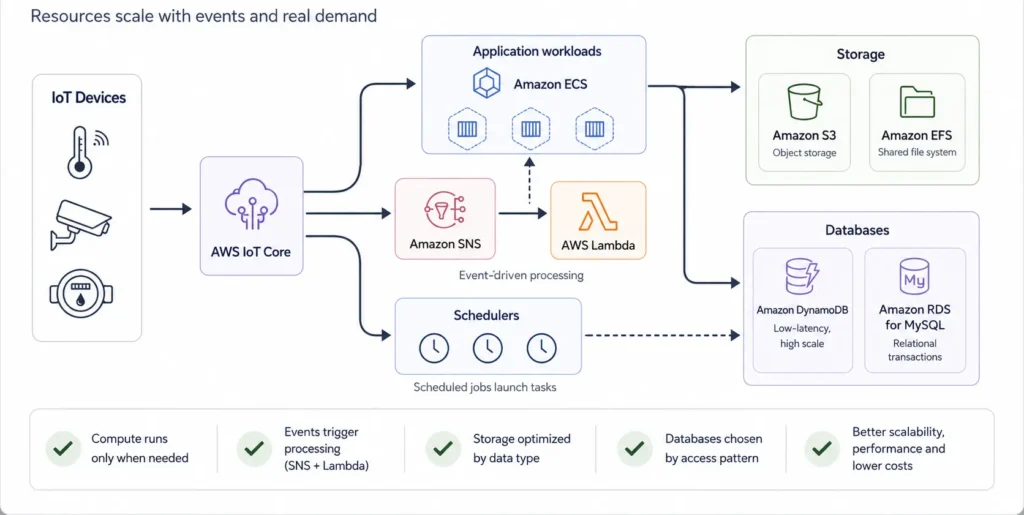
Once we had those answers, we modernized the platform progressively. Here is what our engineers did:
- We containerized the application workloads and ran them on Amazon ECS, loosening their ties to individual servers and making capacity easier to consolidate and scale. ECS did not create the savings on its own, since the underlying compute still had to be configured properly, but it gave us a much better operating model.
- We moved object-like data out of Amazon EFS and into Amazon S3, keeping only what genuinely needed to be mounted and shared on the filesystem.
- We pulled scheduled jobs off the main compute layer and put them behind schedulers, so those resources run when the work actually needs them instead of idling all day.
- We decoupled event-driven processing with Amazon SNS and AWS Lambda, so that work is triggered by a message rather than a worker that sits waiting around the clock.
- We split the database layer by access pattern, introducing DynamoDB for data that needs low-latency access at scale and Amazon RDS for MySQL for relational, transactional data.
The largest impact came from applying all of these cloud best practices together and shrinking the amount of infrastructure that had to stay permanently provisioned. By the end of the project, estimated monthly cloud infrastructure costs were about 45% lower than in the original environment. :)
Not every cloud optimization requires an architectural redesign
This project involved meaningful architecture work, but that is not where every cost-optimization exercise should start.
In many environments, the first savings come from far less dramatic changes: removing resources confirmed as unused, right-sizing oversized instances, switching off development environments outside working hours, reviewing log retention, and improving storage lifecycle policies.
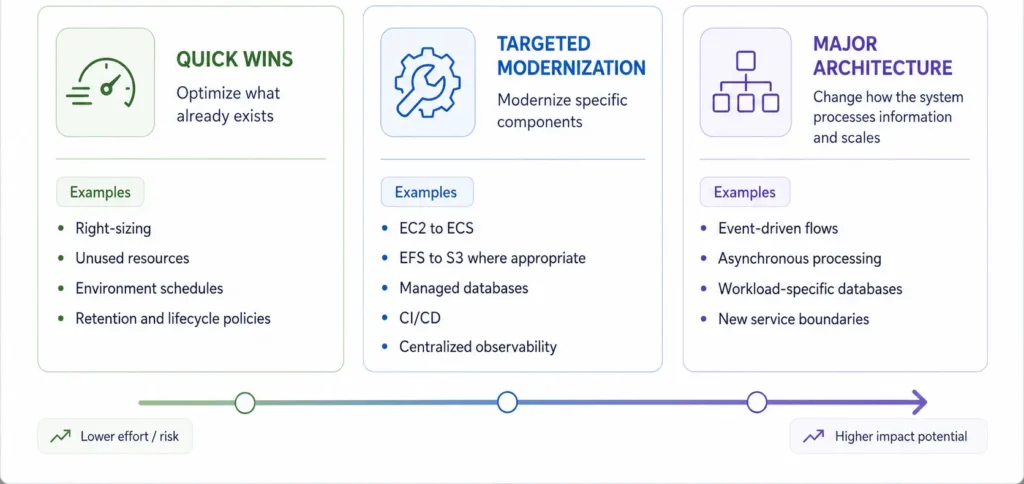
There are really three levels to it:
- Quick wins optimize what already exists and usually need limited application involvement, such as right-sizing, cleaning up unused resources, environment schedules, and retention and lifecycle policies.
- Targeted modernization goes a step further: containerizing a service, moving a self-managed database to RDS, separating static objects from shared file storage, or pulling scheduled jobs off the main server. These need planning and testing, but they do not necessarily change the core logic of the product.
- Major architecture changes go furthest, covering event-driven processing, new service boundaries, asynchronous workflows, or different database models. These affect how components communicate, store information, and scale. At that point, lowering cost may be one reason for the work, but it should not be the only one.
This project combined all three levels. Some improvements were straightforward; the event-processing and database decisions required a deeper understanding of how the platform behaved. That is also why we rolled the changes out progressively rather than as one big migration.
We recommend doing an architecture review to reduce AWS costs
Saving money in the cloud usually starts with a simple question: what are you paying for, and which parts of that spend are actually creating value?
In many environments, the biggest savings do not require a full migration or an expensive rebuild. Our cloud engineering team usually starts by doing a full architecture and cost review, where we look at:
- The biggest cost drivers: Which AWS services and workloads account for most of your monthly bill.
- Unused resources: Servers, databases, storage, and other infrastructure you may no longer need.
- Oversized infrastructure: Resources that are more powerful and expensive than your applications require.
- Storage and data transfer: Where data is stored, how long it is retained, and how often it moves between services.
- Workloads running unnecessarily: Processes that stay active around the clock even when there is no work to complete.
- Scaling and automation: Opportunities to automatically increase or reduce capacity based on actual demand.
- Modernization opportunities: Legacy workloads that could become more efficient through serverless services or targeted architectural changes.
From there, we create a practical optimization plan that separates immediate savings from changes that require deeper engineering work.
If your AWS bill keeps growing and your team cannot clearly explain why, reach out to our team and we’ll help out.
Frequently Asked Questions (FAQ)
What is AWS cost optimization?
AWS cost optimization is the process of reviewing your AWS environment to understand what you are running, what it costs, and how you can reduce spending without compromising performance, reliability, or application functionality.
In practice, our team suggests looking for infrastructure that is no longer needed, larger than necessary, or running in a more expensive way than the workload requires, such as:
- Unused storage volumes: Amazon EBS provides storage for AWS virtual servers. If you delete a server but keep its storage volume, you can continue paying for that storage every month even though no application is using it.
- Oversized virtual servers: Amazon EC2 is AWS’s virtual server service. If an application only uses a small percentage of the CPU and memory available on its server, you may be paying for significantly more computing capacity than you need.
- Old snapshots and backups: Snapshots are point-in-time copies of storage volumes used for backup and recovery. They are useful, but daily or weekly snapshots can accumulate for years if nobody sets a retention policy.
- Expensive networking patterns: NAT Gateways allow workloads in private AWS networks to connect to external services. They are often necessary, but routing large amounts of data through them can become expensive and is worth reviewing.
- Temporary infrastructure that becomes permanent: You might add extra servers, databases, or testing environments for a product launch or project and forget to remove them once the additional capacity is no longer required.
Cost optimization also needs to be ongoing because cloud environments change constantly, for example in cases when:
- A database was upgraded for a product launch: You may increase the size of an Amazon RDS database to handle a temporary spike in traffic. Once traffic drops, you may no longer need that extra capacity, but you will keep paying for it until someone reviews and resizes it.
- Development environments run when nobody is using them: Your developers may only work during business hours, while servers and databases continue running overnight and on weekends. Turning them off or scaling them down outside working hours can reduce unnecessary spend.
- Old backups keep piling up: Keeping recent backups is important for recovery, but storing years of daily snapshots can become expensive if there is no business, legal, or compliance reason to keep them.
Our team generally approaches cost optimization across three areas:
- Eliminate unnecessary resources, including unused storage, idle infrastructure, and forgotten development environments.
- Rightsize existing workloads, so servers, databases, and storage better match actual utilization.
- Improve the architecture where it makes sense, especially when another cloud service can support the same workload more efficiently.
These principles also apply outside AWS. Azure and Google Cloud have different services and pricing models, but the same problems appear across all three platforms: idle infrastructure, oversized resources, unnecessary storage, inefficient networking, and environments that remain running longer than necessary.
How can my organization reduce our AWS bill?
We suggest starting with visibility into where your cloud budget is actually going. For example, the engineering team can use tools such as AWS Cost Explorer to break down spending by service, account, region, and time period, and other tools such as Amazon CloudWatch to understand how heavily different resources are actually being used. If you operate across multiple clouds, you can take a similar approach with Microsoft Cost Management in Azure and Google Cloud Cost Management in GCP.
After understanding the largest cost drivers, we usually ask clients a few questions like: Do you still need this resource? Are you paying for more capacity than you use? Could you run the workload more efficiently?
Our team usually looks at the following areas to cut costs:
- Servers that are larger than necessary: If an EC2 virtual server has significant CPU and memory available but consistently uses only a small percentage, we can evaluate moving the application to a smaller and less expensive server.
- Storage left behind after applications are removed: You may shut down an old application but leave its storage volumes in AWS. Those volumes continue generating costs until someone identifies and removes them.
- Old backups: Automated snapshots can build up quickly. We review how many copies you actually need and whether older backups can be deleted or moved to a less expensive storage tier.
- Development environments running continuously: If your developers only use an environment during the workday, we can evaluate automatically reducing or shutting down capacity during nights and weekends.
- Unused networking resources: Load balancers, public IP addresses, and other networking components may remain after an application or project has been retired.
- Infrastructure from completed projects: Migrations, proofs of concept, and temporary projects often leave cloud resources behind that nobody is actively using.
We also look at whether your cloud infrastructure is larger than it needs to be. Tools such as AWS Compute Optimizer use historical usage data to show where you may be paying for more computing capacity than your applications actually use.
After removing unused resources and resizing what is already running, we can look for additional savings by improving how the environment is designed. This can include automatically adding or removing capacity as demand changes, moving suitable workloads to serverless services, using containers more efficiently, or storing data in lower-cost storage options.
That said, if your environment runs consistently and is unlikely to change significantly, we can also consider using AWS Savings Plans. In short, Amazon offers a more convenient pricing model when you commit to a certain level of AWS usage over a longer period. For example, if you know your AWS compute usage will stay around $10 per hour, you can commit to that level of usage and receive discounted pricing. Sometimes, this is a great strategy to cut costs depending on the specific use case.
What should an AWS architecture review include?
An AWS architecture review should give you a clear understanding of what you are running, what it costs, who owns it, and whether the current architecture still makes sense for the workload.
Our cloud engineering team typically reviews the major areas of the environment, including compute, databases, storage, networking, load balancers, backups, and development and testing environments.
Secondly, we review resource ownership. If we find infrastructure with no clear tags, project name, or owner, it becomes difficult to determine whether it’s still needed. This often leads to resources staying online because nobody wants to risk turning them off.
For example:
- You have a server nobody recognizes: We may find an EC2 virtual server with very little activity but no clear owner or project information. Before removing it, we need to determine whether another application still depends on it.
- A server runs all day for a one-hour task: You may have a batch-processing server that runs a report every night but remains active for the other 23 hours. We can evaluate whether that workload should use computing resources only when the job actually runs.
- Development has the same capacity as production: Your production environment may need powerful servers to support thousands of users, while development is used by only a handful of engineers. We review whether both environments really need the same infrastructure.
- A simple website is running on a full server: A static marketing site may still be hosted on EC2 because that was how it was originally deployed, even though simpler cloud services may now support it at a lower cost.
- Backup data sits on expensive active storage: You may be storing files on a high-performance shared filesystem even though those files are rarely accessed. We can evaluate whether a lower-cost storage option would still meet your requirements.
At the end of the review, you should have a clear roadmap of what to keep, resize, remove, or redesign, along with the areas where we believe you can reduce cloud spend and improve the overall architecture.
What is AWS rightsizing?
AWS rightsizing means matching the amount of cloud infrastructure you pay for to what your applications actually need.
Amazon EC2 offers virtual servers in many different sizes. Larger instances provide more processing power and memory, but they also cost more. Similar sizing decisions apply to databases, containers, and storage. Based on our experience, there are opportunities to rightsize when:
- A server has far more capacity than the application uses: You may be paying for a server with 16 virtual CPUs even though several weeks of monitoring show that the application rarely needs more than four.
- A database was increased temporarily: You may have upgraded an RDS database before a major launch or seasonal traffic period. Once usage returns to normal, we can determine whether that database can safely move back to a smaller configuration.
- A container reserves too much computing capacity: Containerized applications are assigned CPU and memory limits. If those limits are consistently much higher than actual usage, we can evaluate reducing them.
- Storage has more performance than the application needs: You may be paying for a high-performance storage configuration even though the application does not require that level of speed or throughput.
We normally review several weeks of usage data before making these decisions. That allows us to understand average usage, busy periods, and expected traffic patterns rather than optimizing around a single day. We also leave enough headroom for growth and unexpected spikes. If we reduce capacity so aggressively that your application slows down or becomes unstable, we have simply traded infrastructure savings for operational problems.
The same approach applies to Azure Virtual Machines and Google Compute Engine. Regardless of the cloud provider, we want the resources you pay for to reflect the capacity your applications actually use.
Can moving from EC2 to ECS reduce AWS costs?
It certainly can. Especially when your application is already containerized and does not need the same amount of computing capacity throughout the day.
With EC2, you may have a virtual server running continuously even during periods when the application receives very little traffic. Amazon ECS is AWS’s service for running containerized applications, while AWS Fargate allows you to run those containers without managing the underlying servers directly.
This can create cost opportunities in situations such as:
- Your API has variable traffic: You may need several containers during peak business hours but much less capacity overnight. We can configure the environment to scale with demand rather than keeping peak capacity online all day.
- Your development application is only used during working hours: We may be able to reduce capacity during nights and weekends instead of paying for the same resources continuously.
- Your background worker only needs to run when work is available: Rather than keeping a dedicated server online waiting for jobs, we can evaluate a model where compute scales according to the amount of work being processed.
- Your batch process runs for a few hours per day: A workload that processes reports or files once per day may not need a dedicated virtual server running throughout the month.
However, keep in mind that moving to ECS does not automatically reduce your costs. You still need to account for networking, load balancers, logging, storage, and the compute resources the containers use.
For example, if we move a large application from EC2 to Fargate but keep the same CPU and memory running 24/7, your costs may remain similar. The strongest opportunities usually appear when the new architecture allows us to scale resources more closely with actual demand.
When does it make sense to move data from EFS to S3?
Moving data from EFS to S3 can make sense when you are paying for a shared filesystem but your applications do not actually need one.
Amazon EFS is useful when multiple applications or servers need to access and modify the same files at the same time. Amazon S3 is usually a better fit when files mainly need to be stored, retrieved, processed, or archived.
Common examples include:
- Database backups: If you create database exports every night and only keep them in case you need to restore data later, they may not need to sit on EFS. S3 can often store those files more efficiently and at a lower cost.
- Application logs: Logs often need to be retained for months or years, but they usually do not need to remain on a shared filesystem. Moving them to S3 can make long-term storage much more cost-effective.
- Static website files: Images, PDFs, videos, and downloadable assets can often live in S3 instead of using storage attached to a server.
- Machine learning datasets: Large datasets that are mostly read and processed can often be stored in S3 without needing the extra capabilities of a shared filesystem.
- Archived documents: Files kept for compliance, historical records, or occasional access are often a good fit for S3, especially when they are rarely changed.
We would generally keep EFS when several applications need to read and write the same files at the same time, or when the software depends on traditional filesystem behavior.
The high-level goal is to match the type of storage to how the data is actually being used. The same approach applies in other cloud platforms with services such as Azure Blob Storage and Google Cloud Storage. In some environments, changing the storage model can reduce costs without affecting how the application works.
Does AWS cost optimization require rebuilding the entire architecture?
Usually, no. We can often identify meaningful savings by improving your existing environment before considering major architectural changes by:
- Deleting unused storage: Old volumes and backups may remain after applications are removed.
- Reducing oversized servers: We can often move an existing application to a more appropriate server size without changing how the application works.
- Turning down non-production environments: Development and testing infrastructure may not need to run at full capacity overnight or on weekends.
- Cleaning up old project resources: Databases, load balancers, storage, and networking components can remain after migrations or temporary initiatives have ended.
Larger architectural changes become relevant when we find a clear mismatch between the workload and the infrastructure supporting it, such as:
- A static marketing website runs on a full server: If your website mainly consists of HTML, images, and other static content, we may be able to use S3 together with Amazon CloudFront, AWS’s content delivery network, instead of maintaining a dedicated server and load balancer.
- A server runs continuously for a short daily job: If a reporting process runs for one hour each night, we can evaluate an architecture that uses compute only while that process is active.
- Your traffic changes significantly throughout the day: If an application is busy during business hours and almost idle overnight, we can evaluate autoscaling, containers, or serverless options that adjust capacity automatically.
Overall, our team evaluates these changes based on expected savings, engineering effort, migration risk, and operational impact. A technically cheaper architecture is not necessarily worthwhile if the migration costs more than the savings it will produce.
How much can an AWS cost optimization project save?
The savings depend heavily on how your cloud environment has grown and how regularly it has been reviewed. In AWS environments that have grown without regular cost reviews, potential savings can often be around 20% to 40%, especially when a large portion of the bill comes from unused resources and oversized infrastructure. Some cases include:
- Oversized virtual servers: You may be paying for significantly more CPU and memory than your applications actually use.
- Development environments running 24/7: Servers, databases, and networking resources may continue running overnight and on weekends even when nobody is using them.
- Unused storage and snapshots: Old volumes, backups, and snapshots can remain in the account long after the original application or project is gone.
- Idle infrastructure: Load balancers, databases, public IPs, and other resources may continue generating charges even though they are no longer supporting active workloads.
- Expensive data transfer patterns: Large amounts of data may be moving through NAT Gateways, between availability zones, between regions, or out of AWS in ways that increase the monthly bill.
- On-demand pricing for predictable workloads: If part of your infrastructure runs consistently throughout the year, we can evaluate whether committed-use pricing would reduce the cost of that stable baseline.
Every cloud environment is different, so we prefer to review your actual billing and usage data before estimating potential savings. From there, we can build a prioritized optimization plan that shows where you can save, how much effort each change may require, and what impact it could have on your operations.
If you’d like to have a more clear picture of where your cloud costs are going and what can be improved, please check out our Cloud Engineering services.