
Getting slapped in the face with a huge AWS bill is not a pleasant experience. It usually happens for one reason: companies move their servers to AWS but continue running them like physical machines, paying for more capacity than what they really need.
Our team has first-hand experience dealing with this issue. For example, one of our clients, a financial services company, came to us running a legacy platform that handled a critical part of its daily operations. They had already moved it off physical servers and onto AWS, so hardware was no longer their headache, but the bill had climbed to around $23,000 a month! Our client had no idea why, so we helped them find out.
This blog walks through how our cloud engineering team reduced our client’s AWS bill by about 45% ($10,000+/month) without needing to rebuild their infrastructure.
The cost of using AWS usually creeps up due to misuse and oversizing
Let’s start with the first question: How to reduce the AWS costs? In our experience, the companies overpaying on the cloud tend to fall into two camps:
- On-premise migrators. Teams that “lift and shift” their old architecture straight into the cloud, without re-optimizing it for the services and pricing models the cloud actually offers.
- Existing cloud users. Teams already on the cloud but without deep in-house expertise, which leads to configurations that quietly waste money.
Going back to how our client was bleeding money, they had already moved their legacy platform from physical servers to AWS, which solved the immediate problem: no more maintaining hardware or racking new machines every time the system needed more capacity. However, while the platform was hosted in the cloud, it was still being operated like a traditional data center. As the business grew, this always-on infrastructure became increasingly expensive.
The AWS bill kept growing because too many resources stayed on
As the client’s business grew and the platform processed more data, the AWS bill kept increasing until reaching ~$23,000 a month. When we broke it down, these costs were all connected to the same underlying problem: the platform was paying for infrastructure even when it was not fully using it.
- EC2 was the biggest cost driver at roughly $9,000 per month. Several workloads were sized for peak demand but used only a fraction of their capacity most of the day. Some databases were also running on EC2 when managed database services could have supported them more efficiently.
- Too many resources stayed active between jobs. Some processes needed to run continuously, but many scheduled jobs only ran a few times per day. The infrastructure behind them remained active even when no processing was taking place.
- EFS was being used for data that did not require shared storage. Some information needed a shared filesystem, but much of it behaved like individual files that were simply uploaded, stored, and retrieved. As the platform grew, keeping everything in EFS became increasingly expensive.
We saved $10k+/month by right-sizing and using cloud-native services
Before we changed a single piece of the architecture, we started where every cost review should start: working out exactly what the client was paying for, and how much of it they were actually using. In the cloud, you pay for compute by the hour, and every service bills on its own meter, so the useful question is never “is AWS expensive?” It is “are we paying for capacity that sits idle?” More often than not, the answer is yes. Here are three tips to keep in mind:
1. Right-size your infrastructure
Before changing the architecture, start by matching the capacity you pay for with what the platform actually uses. Think of it as filling a glass with a tap instead of a fire hose. Our team generally recommends using AWS Compute Optimizer to analyze real usage patterns and recommend the right instance types and sizes for each workload.
2. Use cloud-native services
The second lever is using AWS services for the jobs they were designed to handle. For example, a managed load balancer is usually cheaper and easier to operate than running one yourself on a general-purpose virtual machine.
The same applies to databases. Managed services such as Amazon RDS or DynamoDB are often more efficient than operating a database manually on EC2.
3. Automate when resources run
The third lever is automation, which makes sure you only pay for resources when they are actually needed. For example, configuring auto-scaling automatically adds capacity when traffic increases and removes it when demand drops, preventing the platform from running oversized infrastructure during quieter periods. Additionally, schedulers work in a similar way by turning development and testing environments off at night and on weekends, when nobody is using them. Overall, automating AWS resources reduces the amount of infrastructure that sits idle while continuing to generate charges.
Our team modernized the legacy infrastructure one workload at a time
After a few weeks of digging deeper, we realized that AWS was not the issue. The infrastructure simply no longer matched the way the product was being used. A full rewrite might have produced a cleaner architecture diagram, but it would have taken longer, demanded far more product involvement, and introduced risks that were hard to justify on infrastructure cost alone.
So instead, we separated the platform into workloads and looked at what each one actually needed:
- Which processes had to stay continuously available
- Which ones could start on a schedule?
- Which jobs could be triggered by an event instead of a permanently running worker?
- Which information genuinely required shared filesystem access?
- Where did relational transactions matter, and where was predictable, low-latency access more important?
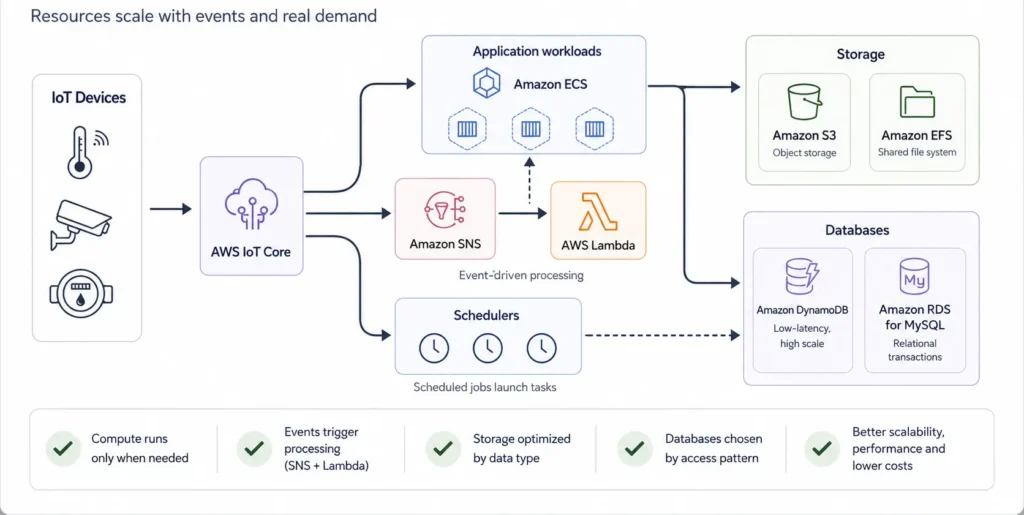
Once we had those answers, we modernized the platform progressively. Here is what our engineers did:
- We containerized the application workloads and ran them on Amazon ECS, loosening their ties to individual servers and making capacity easier to consolidate and scale. ECS did not create the savings on its own, since the underlying compute still had to be configured properly, but it gave us a much better operating model.
- We moved object-like data out of Amazon EFS and into Amazon S3, keeping only what genuinely needed to be mounted and shared on the filesystem.
- We pulled scheduled jobs off the main compute layer and put them behind schedulers, so those resources run when the work actually needs them instead of idling all day.
- We decoupled event-driven processing with Amazon SNS and AWS Lambda, so that work is triggered by a message rather than a worker that sits waiting around the clock.
- We split the database layer by access pattern, introducing DynamoDB for data that needs low-latency access at scale and Amazon RDS for MySQL for relational, transactional data.
The largest impact came from applying all of these cloud best practices together and shrinking the amount of infrastructure that had to stay permanently provisioned. By the end of the project, estimated monthly cloud infrastructure costs were about 45% lower than in the original environment. 🙂
Not every cloud optimization requires an architectural redesign
This project involved meaningful architecture work, but that is not where every cost-optimization exercise should start.
In many environments, the first savings come from far less dramatic changes: removing resources confirmed as unused, right-sizing oversized instances, switching off development environments outside working hours, reviewing log retention, and improving storage lifecycle policies.
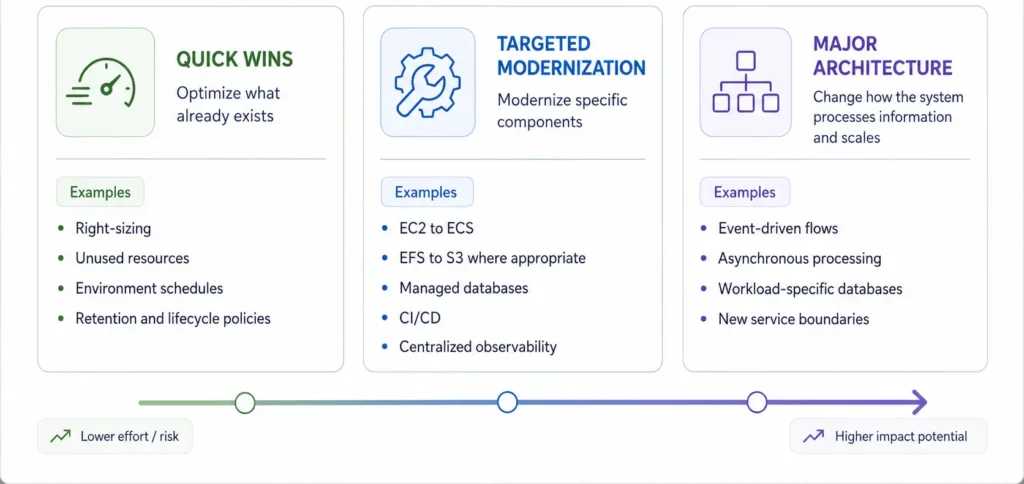
There are really three levels to it:
- Quick wins optimize what already exists and usually need limited application involvement, such as right-sizing, cleaning up unused resources, environment schedules, and retention and lifecycle policies.
- Targeted modernization goes a step further: containerizing a service, moving a self-managed database to RDS, separating static objects from shared file storage, or pulling scheduled jobs off the main server. These need planning and testing, but they do not necessarily change the core logic of the product.
- Major architecture changes go furthest, covering event-driven processing, new service boundaries, asynchronous workflows, or different database models. These affect how components communicate, store information, and scale. At that point, lowering cost may be one reason for the work, but it should not be the only one.
This project combined all three levels. Some improvements were straightforward; the event-processing and database decisions required a deeper understanding of how the platform behaved. That is also why we rolled the changes out progressively rather than as one big migration.
We recommend doing an architecture review to reduce AWS costs
Saving money in the cloud usually starts with a simple question: what are you paying for, and which parts of that spend are actually creating value?
In many environments, the biggest savings do not require a full migration or an expensive rebuild. Our cloud engineering team usually starts by doing a full architecture and cost review, where we look at:
- The biggest cost drivers: Which AWS services and workloads account for most of your monthly bill.
- Unused resources: Servers, databases, storage, and other infrastructure you may no longer need.
- Oversized infrastructure: Resources that are more powerful and expensive than your applications require.
- Storage and data transfer: Where data is stored, how long it is retained, and how often it moves between services.
- Workloads running unnecessarily: Processes that stay active around the clock even when there is no work to complete.
- Scaling and automation: Opportunities to automatically increase or reduce capacity based on actual demand.
- Modernization opportunities: Legacy workloads that could become more efficient through serverless services or targeted architectural changes.
From there, we create a practical optimization plan that separates immediate savings from changes that require deeper engineering work.
If your AWS bill keeps growing and your team cannot clearly explain why, reach out to our team and we’ll help out.