

An FDE uses AI to automate manual work
With AI, almost every company is under pressure to show results quickly. This has created the need for hiring engineers who can build automation workflows or prototypes in just a few weeks that can work well enough to convince leadership to put more money into automation. This new and emerging role has a name: Forward Deployed Engineer.
A Forward Deployed Engineer (FDE) is an AI implementation engineer who combines technical knowledge and communication skills to understand business requirements and prompt AI agents to automate manual work.
Our CEO, Matias Jacob, who has several years of experience working as an FDE, defines this role as a “translator.” An FDE takes that loosely defined problem, studies the process behind it, and turns it into something that can be deployed with AI. We typically hear comments from clients such as:
- “Our team spends too much time reviewing these documents.”
- “We have to copy the same information into three systems.”
- “Customer support keeps answering the same questions.”
- “It takes us several days to prepare this report.”
- “We want to use AI, but we do not know which process to automate first.”
Onboarding an AI solutions engineer makes sense when there is a clear pain point and no clearly defined way of automating it.
| When an FDE makes sense | How an FDE helps |
|---|---|
| You want to implement AI but do not know which use case to start with. | Identifies and prioritizes use cases that are practical to test and likely to create value. |
| Employees spend too much time on repetitive manual work. | Maps the workflow and identifies where AI or traditional automation can remove manual steps. |
| Business and engineering teams struggle to connect their perspectives. | Translates business requirements into technical solutions that engineering teams can build. |
| You have an AI feature idea but do not know if it will have real impact. | Validates the idea with users, prototypes the solution, and tests it against the actual workflow. |
| You need to test an idea quickly without building a complete product. | Builds a focused prototype or MVP to validate the concept before making a larger investment. |
| AI usage is growing without consistent technical controls. | Helps define model selection, architecture, costs, security, integrations, and governance. |
One concrete example comes from a past project in the logistics and freight brokerage industry, where we helped automate the carrier and load sales process, which had previously been handled entirely through manual phone calls. Our team designed and deployed an AI voice agent that handles the negotiation-heavy calls that sit between shippers’ load requests and the carriers who move the freight.
The solution covered both directions of the brokerage’s call flow, automating the conversations that had previously been handled manually by the team:
- Outbound carrier calls: When a customer submitted a load, the AI agent called potential carriers, shared the load details, and negotiated the rate until a carrier accepted the job.
- Inbound carrier calls: Carriers could also call looking for work, such as a driver in Houston looking for a return load to Miami. The agent searched available loads, found a suitable match, and negotiated the rate during the call.
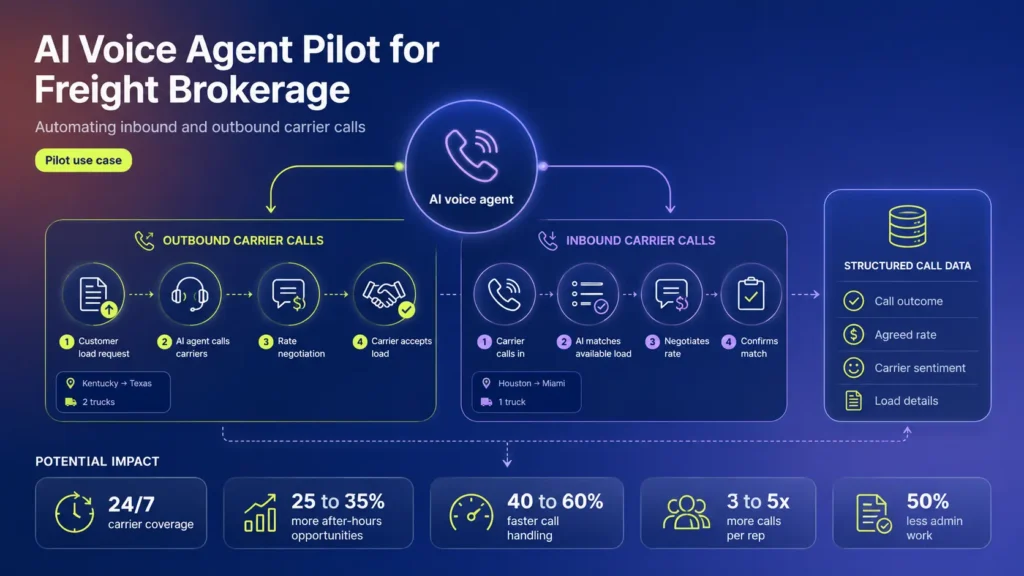
Across both flows, the agent captured the key details and outcomes from each conversation, giving the brokerage a clean, structured record instead of scattered manual notes.
Since this was a pilot, these were not measured production results. However, the potential impact of automating the process included:
- 24/7 carrier coverage: Potential to recover 25 to 35% of after-hours booking opportunities.
- Faster load matching: Potential to reduce call handling time by 40 to 60%.
- More volume per rep: Potential to handle 3 to 5x more calls without adding headcount.
- More consistent rate negotiation: Potential to improve margin per load by 3 to 8%.
- Automatic call data capture: Potential to cut post-call admin work by 50%.
All of that potential improvement comes from a unique blend of skills: understanding what the client needs, and knowing how to build workflows with code, leading us to the next point.
Implementing AI solutions requires both technical and soft skills
The FDE role is still a bit hard to define, because it is basically an engineer who sits somewhere betweenproduct, implementation, and customer success. The broader discussion among experienced developers opens up the debate: how technical should an FDE be, and how much of the job should involve working directly with customers?
Based on our experience, the answer depends on what each and every client needs. An FDE may spend one hour speaking with a client to understand why a workflow is broken, the next hour debugging an integration, and the rest of the day building and testing an AI solution with the engineering team. The skill split looks may roughly like this:
- Soft skills: 60%: Communicating well, asking the right questions, spotting opportunities to automate, and understanding what is actually slowing the client down.
- Technical skills: 40%: Using tools like Claude and GPT to quickly build working solutions, integrate with existing systems, and operate across different tech stacks.
So, after finding the right person to incorporate AI automation across the organization, the next step is understanding how to do it securely, in a way that is useful at scale. Let’s dig deeper into that…
Security and AI token usage are critical factors
To effectively implement an AI solution, companies need to consider both cost and security from the start. Some AI models can consume large amounts of tokens and become expensive really quickly. At the same time, deploying AI without security guardrails in place can allow agents to accidentally share information or create meaningful risks across the organization. Here are a few important suggestions:
1. Don't use AI for every task
One of the biggest mistakes companies make is putting AI in parts of a workflow where traditional software (without agents) could do a better job.
A useful solution should deploy agents only when it adds value. So, we suggest to:
- Use standard code for calculations, permissions, validation, dates, business rules, and other tasks that should produce a predictable result.
- Deploy AI for language, interpretation, summarization, classification, pattern recognition, and other tasks where some ambiguity is expected.
- Add security guardrails or approvals before AI can update records, send messages, approve requests, or take other meaningful actions.
2. Choose the right environment for sensitive AI workloads
AI should never be left running on uncontrolled environments, especially when handling sensitive or business-critical data. A few safer options involve using:
- Hosted AI providers: Fast to deploy, but companies need to understand how data is stored, retained, and protected.
- Managed cloud AI services: AWS, Azure, and Google Cloud offer enterprise AI services that can support requirements such as SOC, ISO, or HIPAA.
- Private or self-hosted models: Provide greater control over infrastructure and data, but require the company to manage security, monitoring, patching, and maintenance.
While using out of the box AI services is useful, make sure to still verify the specific service you are using, as well as the region, contract, configuration, and surrounding architecture.
3. Give the model the right company context
A general-purpose model does not automatically understand your products, policies, systems, contracts, or internal terminology. One common solution is using retrieval-augmented generation (RAG): the application retrieves relevant information from company documents, databases, or knowledge bases and provides it to the model as context for each request. In our own experience, using tools such as Pinecone, Chroma, and managed vector stores can help retrieve the most relevant information. Doing so allows the model to work with current company data instead of relying only on what it learned during training.
4. Create a dedicated AI development environment
AI coding agents become much more useful when they understand how the application actually works. That can require access to:
- Code, logs, and test results
- Database schemas and APIs
- Existing integrations
- Jira tickets and Figma designs
- Deployment configurations and expected application behavior
Our team recommends giving agents access to a dedicated development environment that closely mirrors production, with least-privilege permissions, controlled credentials, monitoring, and masked or synthetic data whenever possible. This gives the agent enough context to investigate and test solutions without providing unrestricted access to production systems.
5. Control AI costs through model orchestration
Keep in mind that using expensive reasoning models is not a good idea for simple extraction, classification, or formatting, as it can increase token costs without achieving a meaningful result. We suggest to:
- Use smaller/cheaper models for simple tasks.
- Use expensive/more capable models for difficult reasoning or debugging.
- Use regular code (without agents) when the result is predictable.
- Limit unnecessary context, cache repeated information, and set spending limits.
This becomes especially important with AI agents, which may repeatedly inspect code, logs, and tool outputs. In one development workflow our team reviewed, intensive agent usage could consume roughly $800- $3,000 per day in tokens, per developer! We warned you… haha
6. Don't fine-tune by default
Fine-tuning means training an existing AI model on your own examples so it becomes more consistent at a specific task, format, classification system, or type of response. It can be useful, but it also requires good training data, testing, and ongoing maintenance.
Before fine-tuning, consider a few things:
- Try simpler approaches first. Better prompts, retrieval, tools, or workflow design may solve the problem without additional training.
- Fine-tune when consistency really matters. Good use cases include document classification, structured data extraction, or outputs that need to follow a very specific format.
- Use high-quality training data. Poorly labeled or inconsistent examples will produce inconsistent results.
- Test the fine-tuned model carefully. Evaluate normal requests, edge cases, bad inputs, security risks, and situations where the model should refuse to act.
On that note, testing goes hand in hand with what AI usage and AI security guidelines your organization has put in place, leading us to the next point.
7. Always establish clear guidelines for AI-generated content
AI is also being used across marketing, sales, support, and internal communications. Without shared guidelines, teams can quickly produce inconsistent or inaccurate content. We strongly suggest that all organizations use:
- Approved AI tools and models
- Voice, terminology, and words to avoid
- Rules for confidential information
- Fact-checking and source requirements
- When human review is mandatory
Different models may perform better for different tasks, so teams should evaluate them using real company use cases and establish a repeatable process for how AI-generated content is created and reviewed, along with what model to use for each specific use case.
We’ve covered a lot of things to consider above, but if there’s one thing you should take out of this blog, it’s that…
An FDE just makes automation easier
Hiring an AI deployment engineer with a strong technical background + soft skills is a fantastic option for companies looking to automate processes with software solutions that deliver fast time to value. Looking at the data, we can quickly see that the FDE role continues to grow non-stop. Pave analyzed data from roughly 9,000 companies and found rapid adoption of FDE and FDE-like roles in the past couple of years.
Finally, with demand for FDEs growing and agentic coding making engineers more productive, having soft skills like client-facing communication is becoming a competitive advantage.
If your organization is looking for AI engineers, Ewents provides nearshore Forward Deployed Engineers from Latin America. Our bilingual AI engineers integrate directly with clients and dev teams to deploy enterprise AI automations at ultra-competitive rates.
Frequently Asked Questions (FAQ)
What is a Forward Deployed Engineer (FDE)?
A Forward Deployed Engineer (FDE) is an AI engineer who helps solve important business problems with technology. They work closely with the client to understand how the business operates, identify what is slowing people down, and figure out what kind of solution could help.
Because AI and modern development tools make it much faster to build and test ideas, an FDE can often take a problem from a conversation to a working first version without needing a large engineering team.
What does a Forward Deployed Engineer do?
An FDE first looks at how people actually work. They look for repetitive tasks, bottlenecks, disconnected systems, and manual processes that could be improved with software or AI.
From there, they can connect APIs, use AI models, process documents or images, and build a proof of concept. That first version is tested with real users, improved based on feedback, and expanded if it proves useful.
When should my company hire a Forward Deployed Engineer?
An FDE is useful when a company knows a process could be improved or automated but does not yet know exactly what to build.
For example, employees may be spending hours on repetitive work, the company may have an AI initiative without a clear implementation plan, or business teams may struggle to explain their needs to engineering.
An FDE can also help find automation opportunities that the company has not identified yet.
How is a Forward Deployed Engineer different from a software engineer?
A Software Engineer usually spends more time building and maintaining the software itself. An FDE spends more time understanding the business problem and deciding what should be built.
For example, an FDE might sit with users, identify a bottleneck, connect several systems, and quickly build the first version. Once the idea works, Software Engineers can help make the solution more scalable, reliable, and ready for long-term use.
In many projects, both roles work together at different stages.
How is a Forward Deployed Engineer different from a Technical Project Manager?
A Technical Project Manager usually helps define requirements, organize the work, coordinate teams, and keep the project moving.
An FDE is more hands-on. They can have many of the same conversations with the client, but they also build the solution. That could mean creating an integration, automating a workflow, connecting an AI model, or building a proof of concept.
This mix of client communication and technical execution is a big part of what makes the FDE role valuable.
What should a Forward Deployed Engineer build first?
Usually, the simplest/easiest solution that can create meaningful value.
FDEs often follow an 80/20 pareto mindset: try to solve roughly 80% of the problem with 20% of the effort. They usually start with the biggest bottleneck or most repetitive part of a workflow instead of trying to automate everything at once.
Once that first solution is working, the company can test it with users, measure the results, and decide whether it makes sense to expand it.
How does a Forward Deployed Engineer decide when to use AI?
A good FDE knows that AI does not belong in every part of a workflow.
Traditional software is usually better for predictable tasks like calculations, permissions, validations, and transactions, where the same input should produce the same result every time.
AI is more useful when the system needs to interpret something less structured, such as a document, image, conversation, user request, or piece of text.
In practice, most good AI automations combine both. AI handles interpretation, while traditional software handles the predictable parts of the workflow.